Lattice
Organize your data.
A life data studio that runs entirely on your device.
macOS users: If you see “Lattice.app is damaged”, run this in Terminal:
xattr -cr /Applications/Lattice.app
Lattice is a real-time collaborative note-taking app that extends Markdown with tables, formulas, and charts.
Overview
In typical Markdown editors, data entered into tables remains just static text. With Lattice, you can aggregate data using formulas, visualize it with charts, and export it as PDF. From recording to deliverables, everything is completed in a single note.
All your data is stored on your device. It’s never uploaded to external servers. Yet, real-time collaborative editing is possible through P2P. You can share with your team while keeping your privacy intact.
Everything is expressed as extended Markdown syntax, enabling spreadsheet-like dynamic functionality while maintaining data portability.
Demo
Features
1. Named Tables
Assign IDs to Markdown tables, making them referenceable from other elements.
@table:expenses
| Item | Amount |
|------|--------|
| Food | 8500 |
| Transport | 3200 |
| Entertainment | 5000 |- Assign a unique ID (
expenses) to the table - Reference by ID from formulas and charts
- Directly editable UI
2. Formulas
Two types of syntax for calculations that reference table data.
Inline Formula
This month's total: {SUM(expenses:Amount)} yenBlock Formula
[[calc: Monthly Expenses | SUM(expenses:Amount)]]Supported Functions
SUM(table:column)- SumAVG(table:column)- AverageCOUNT(table:column)- CountMIN(table:column)- MinimumMAX(table:column)- Maximumtable:column- Single cell reference- Arithmetic operators (
+,-,*,/)
3. Charts
Visualize table data as charts.
@chart:bar:expenses:Monthly Expenses- Bar chart:
@chart:bar:tableId:title - Line chart:
@chart:line:tableId:title - Pie chart:
@chart:pie:tableId:title
Charts update in real-time when table data changes.
4. Dynamic Tables
Extract and display data from source tables with conditions.
@filter:settlements FROM balances WHERE balance < 0
| Name | Amount Due |
|------|------------|
| {name} | {balance * -1} |FROM: Source table IDWHERE: Filter condition (<,>,<=,>=,==,!=)- Define output format with template rows
{columnName}references source table columns{expression}embeds formulas
5. Real-time Collaborative Editing
Share with multiple people just by sharing a URL and password.
- Real-time cursor position sharing
- Instant content synchronization
- Automatic merge when offline
6. Color Theme Support
Switch between light and dark themes to match your preference or environment.
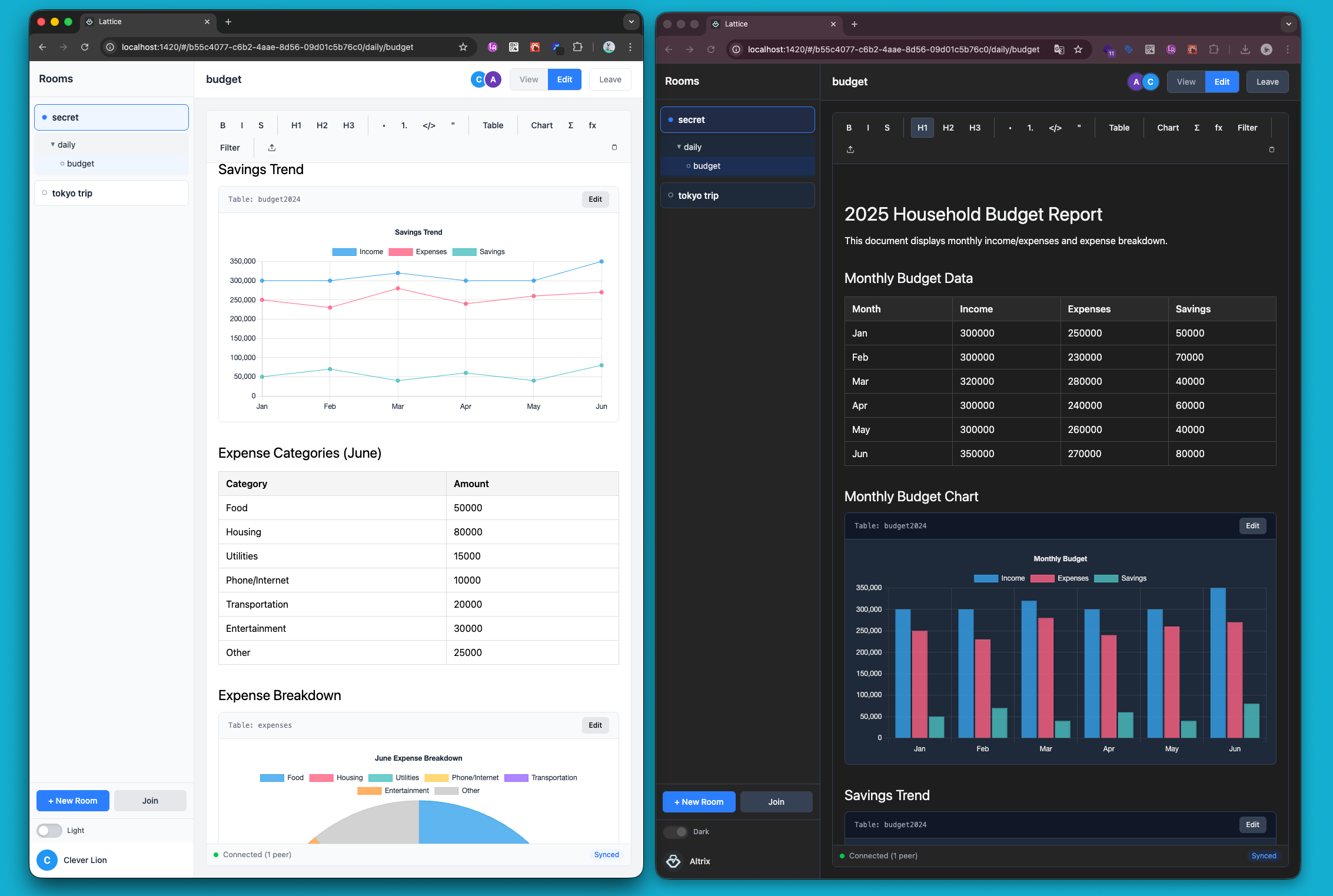
- Light and dark mode
- Follows system preference by default
- Manually switchable at any time
7. Responsive Design
Optimized for all screen sizes, from desktop to mobile.
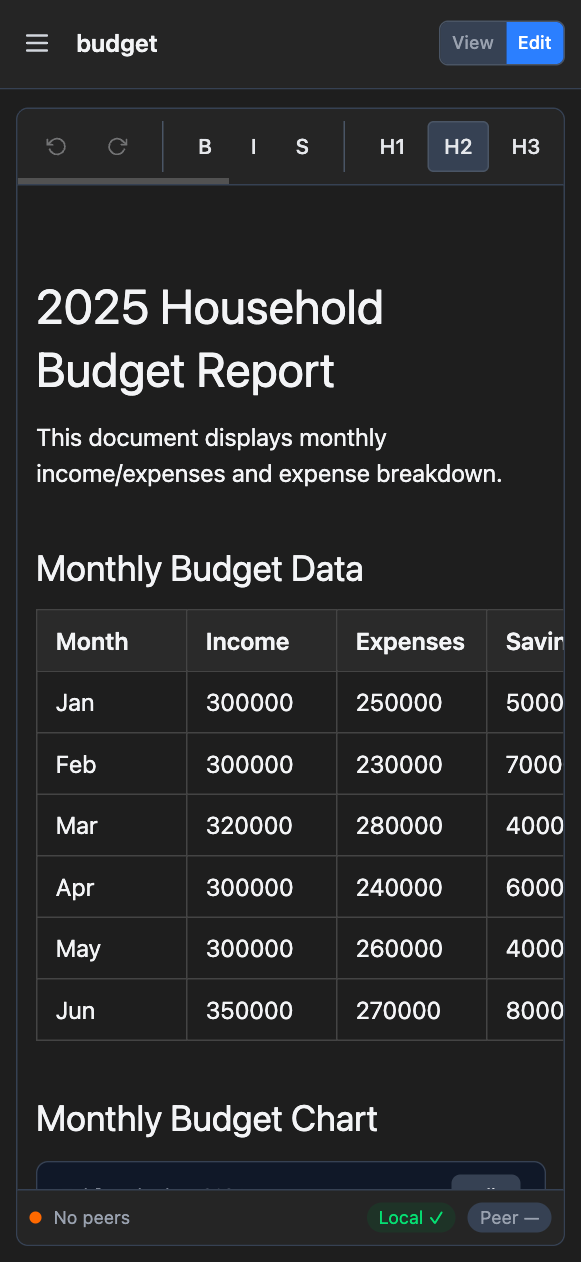
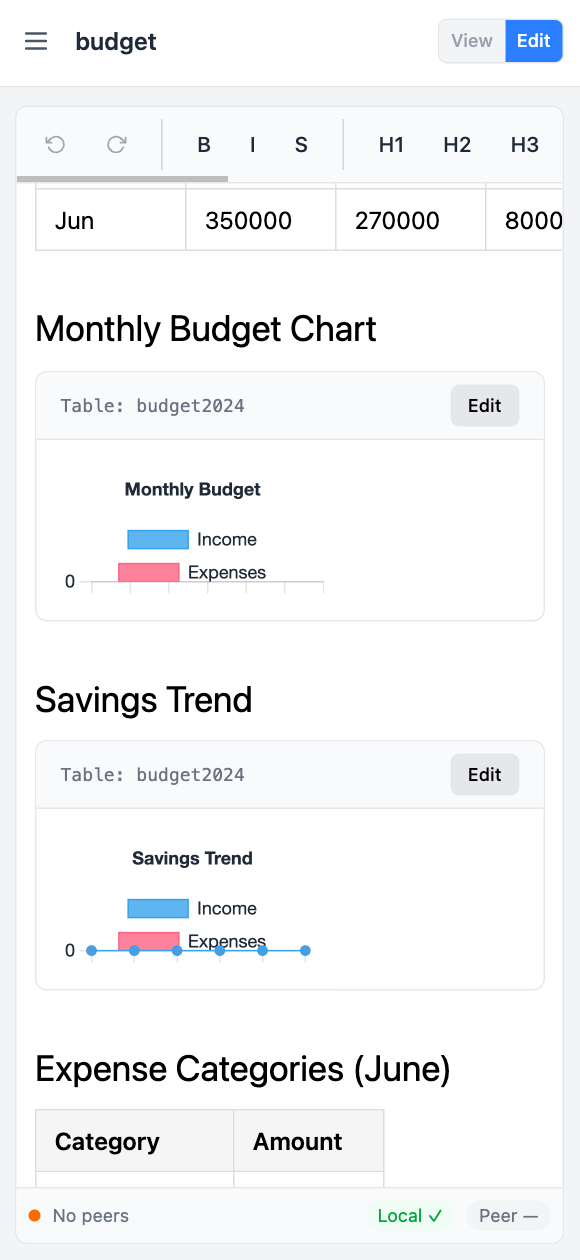
- Adapts to any screen size
- Touch-friendly interface on mobile
- Consistent experience across devices
How It Works
Extended Markdown Syntax
We extend standard Markdown with the following syntax.
| Syntax | Purpose |
|---|---|
@table:id | Assign ID to table |
@chart:type:tableId:title | Insert chart |
@filter:id FROM src WHERE cond | Dynamic table |
{formula} or {=formula} | Inline formula |
[[calc: label | formula]] | Block formula |
These syntaxes are automatically parsed on paste and converted to corresponding UI components.
Formula Engine
Formulas are processed as follows:
- Parse: Analyze the expression and extract table references
- Table Lookup: Search for tables by ID in the document
- Data Extraction: Retrieve data from specified columns
- Evaluation: Execute functions and arithmetic operations
- Reactive Update: Automatically recalculate on document changes
Real-time Sync with P2P + CRDT
Serverless Architecture
┌──────────┐    WebRTC    ┌──────────┐
│ Client A │◄────────────►│ Client B │
└──────────┘              └──────────┘
     │                          │
     ▼                          ▼
┌──────────┐              ┌──────────┐
│ IndexedDB│              │ IndexedDB│
│ (Local)  │              │ (Local)  │
└──────────┘ └──────────┘- Yjs (CRDT): Automatic conflict resolution in distributed environments
- y-webrtc: P2P communication between browsers
- y-indexeddb: Local data persistence
- Signaling server: Used only for connection establishment (data doesn’t pass through)
What This Design Enables
- No server required: No need for data storage servers
- Completely free: Zero server operation costs
- Privacy protection: Data is transmitted directly between devices
- Offline support: Edit without network connection
- Auto merge: Automatically integrate changes when back online
Use Cases
Budget Tracking
@table:expenses
| Date | Category | Amount |
|------|----------|--------|
| 12/1 | Food | 1500 |
| 12/1 | Transport | 320 |
| 12/2 | Food | 2200 |

This month's total: {SUM(expenses:Amount)} yen
Food total: [[calc: Food | SUM(expenses:Amount)]]

@chart:pie:expenses:Expenses by Category
Bill Splitting
@table:payments
| Name | Paid | Share | Difference |
|------|------|-------|------------|
| Alice | 10000 | {AVG(payments:Paid)} | {Paid - AVG(payments:Paid)} |
| Bob | 5000 | {AVG(payments:Paid)} | {Paid - AVG(payments:Paid)} |

@filter:settlements FROM payments WHERE Difference < 0
| Name | Amount to Pay |
|------|---------------|
| {Name} | {Difference * -1} yen |
Habit Tracker
@table:habits
| Date | Exercise | Reading | Meditation |
|------|----------|---------|------------|
| 12/1 | 1 | 1 | 0 |
| 12/2 | 1 | 0 | 1 |
| 12/3 | 0 | 1 | 1 |

Exercise completion rate: {AVG(habits:Exercise) * 100}%
@chart:line:habits:Habit Tracking
Project Management (Team Sharing)
@table:tasks
| Task | Assignee | Estimated h | Actual h | Status |
|------|----------|-------------|----------|--------|
| Design | Alice | 8 | 10 | Done |
| Implementation | Bob | 16 | 12 | In Progress |
| Testing | Carol | 8 | 0 | Not Started |

Total estimated: {SUM(tasks:Estimated h)}h
Total actual: {SUM(tasks:Actual h)}h

@chart:bar:tasks:Hours Comparison
Key Differentiators
| Feature | Lattice | Typical Note Apps | Spreadsheets |
|---|---|---|---|
| Markdown | Supported (extended) | Supported | Not supported |
| Formulas | Supported | Not supported | Supported |
| Charts | Supported | Limited | Supported |
| Real-time collaboration | Supported (P2P) | Supported (via server) | Supported (via server) |
| Data storage | Device only | Server | Server |
| Monthly fee | Free | Paid plans available | Paid plans available |
| Offline editing | Full support | Partial | Partial |
| Privacy | No external transmission | Stored on server | Stored on server |
Lattice’s Advantages
- Text-based computation: Spreadsheet calculation power while maintaining Markdown’s lightweight nature
- Serverless collaboration: Free to provide with no server costs
- Privacy-first: Data is never stored on external servers
- Offline-first: Fully functional without network connection
Tech Stack
- Editor: TipTap (ProseMirror)
- CRDT: Yjs
- P2P Communication: y-webrtc (WebRTC)
- Local Persistence: y-indexeddb (IndexedDB)
- Charts: Chart.js
- Framework: React + TypeScript
- Desktop: Tauri
Roadmap
- PDF/CSV export
- Mobile app support
- Custom templates
- Advanced functions (date calculations, conditionals, etc.)